
A New Dawn: Moving from Selenium to Playwright

For over a decade, Selenium was the undisputed king of browser automation. Every QA engineer knew it. Every job listing mentioned it. It was the first tool you learned and the last one you questioned.
But somewhere along the way, the web evolved faster than Selenium could keep up. And when we finally made the switch to Playwright, we didn’t just change tools — we changed how our entire team thinks about testing.
This is the story of that transition.
The Selenium Era: What Worked
Let’s be fair to Selenium. It earned its place:
- Massive ecosystem — WebDriver bindings in every language, a decade of Stack Overflow answers, and a community that solved almost every edge case.
- Cross-browser support — When “it works in Chrome” wasn’t good enough, Selenium had your back.
- Enterprise adoption — Every CI/CD pipeline in enterprise had Selenium somewhere in the chain.
- Proven at scale — We ran thousands of tests across multiple products with Selenium Grid.
For years, this was enough. Our C# + Selenium + xunit stack was reliable, well-understood, and deeply embedded in our delivery pipelines.
Where the Cracks Started Showing
But over time, the pain points became impossible to ignore:
The Monolith Testing Trap
In many organizations — including large-scale platforms with millions of users — Selenium tests were tightly coupled to monolithic deployments. Tests ran against shared environments after deployment, meaning any unrelated service outage could fail your entire test suite.
Imagine this: your team deploys a search feature, but a completely unrelated payment API is down for maintenance. Your Selenium tests hit that API indirectly, and suddenly your deployment is blocked by a failure that has nothing to do with your code.
This is what the testing architecture looked like in the monolith era:
Yes
No
🖥️ Monolith Application
🌐 Shared Test Environment
🧪 Selenium Test Suite
📡 Service A – Search API
📡 Service B – Payment API
📡 Service C – Auth Service
📡 Service D – Recommendation Engine
❌ Any service down?
🔴 ALL tests fail
🟢 Tests pass
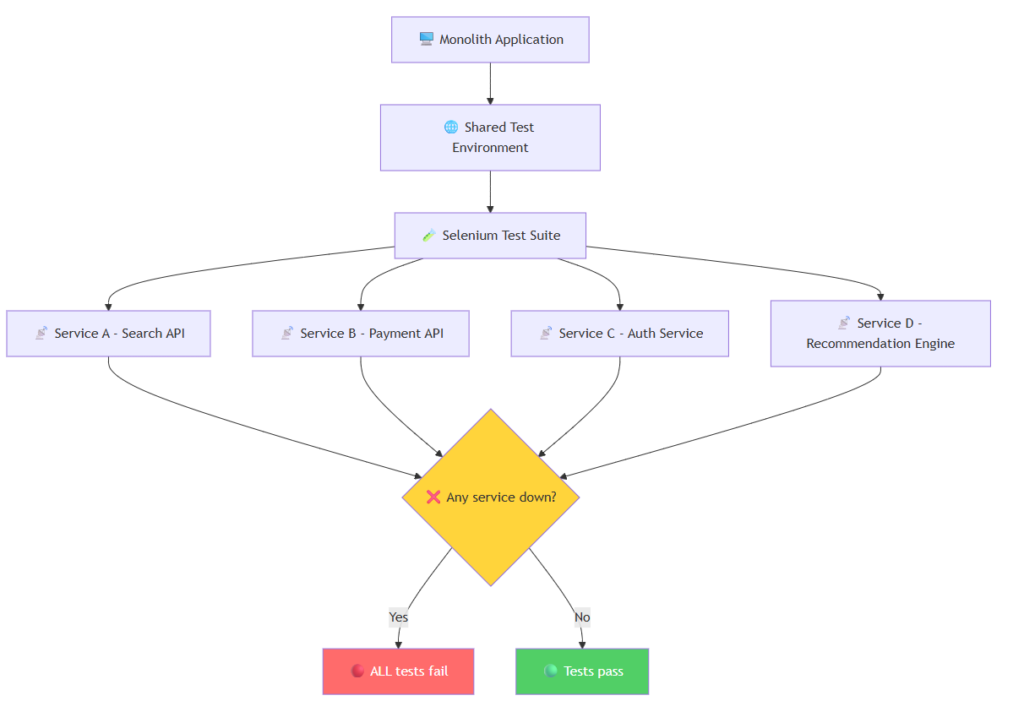
Fig 1: In a monolith, one broken dependency fails the entire suite — even tests unrelated to the change.
The result? Teams started seeing 30-40% flaky test failure rates. Engineers stopped trusting red builds. “Just re-run it” became the default response. The test suite that was meant to catch bugs was now actively slowing down delivery.
Flaky Tests Were Eating Our Confidence
ElementNotInteractableException
StaleElementReferenceException
TimeoutException
These weren’t edge cases — they were daily occurrences. We spent more time debugging test infrastructure than actual product bugs. The team started ignoring red builds because “it’s probably just a flaky test.”
Waiting Was an Art, Not a Science
Selenium’s approach to waiting was fundamentally broken for modern SPAs. We had Thread.Sleep() scattered everywhere, explicit waits that didn’t quite work, and custom retry wrappers that added complexity without reliability.
Setup Overhead Was Brutal
- Download the right ChromeDriver version
- Match it to the browser version on CI
- Configure Grid nodes
- Handle browser-specific quirks in headless mode
- Debug why it works locally but fails in the pipeline
Every new team member spent their first week fighting with Selenium setup instead of writing tests.
Modern Web Patterns Left Behind
Shadow DOM, iframes within iframes, service workers, WebSocket-driven UIs — Selenium was designed for a simpler web. Making it work with modern architectures required increasingly hacky workarounds.
No Integrated Mocking for External Dependencies
One of the most painful gaps in Selenium was the inability to easily mock external API calls. When your tests hit real services, you’re not testing your application — you’re testing the entire distributed system. Selenium’s own documentation acknowledged this as a best practice but provided no integrated tooling for it. Third-party tools like WireMock could help, but adding and maintaining another layer of infrastructure rarely paid off, especially for teams already struggling with test reliability.
The Architecture Shift: From Monolith to Microservice Testing
The move away from Selenium wasn’t just a tool swap — it coincided with a fundamental rethinking of testing architecture. As organizations moved from monoliths to microservices, the testing strategy had to evolve too.
Instead of running all tests against a shared deployed environment, the new approach was clear: test each service independently, mock external dependencies, and run tests at build time.
Evolution
✅ New: Microservice Testing with Playwright
Build Time – Local Server
Run Playwright Tests
Mock External APIs
🟢 Fast & Isolated
❌ Old: Monolith E2E Testing
Deploy to Shared Env
Run Full Selenium Suite
Hit ALL Real Services
🔴 Fragile & Slow
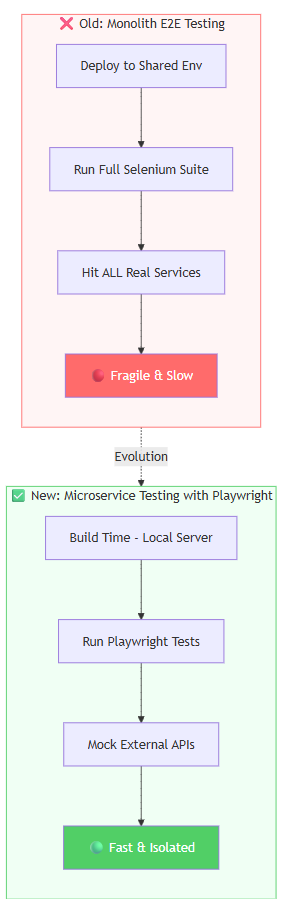
Fig 2: The architectural shift from fragile end-to-end testing to isolated, mocked, build-time testing.
This shift brought several advantages:
- Tests run on build — no need to deploy to a shared environment first
- External calls are mocked — your tests verify your application, not third-party uptime
- Faster feedback — know about failures in minutes, not after a 45-minute deployment pipeline
- Team independence — one team’s changes never break another team’s tests
Enter Playwright
When Microsoft released Playwright, it wasn’t just “another Selenium alternative.” It was a rethinking of what browser automation should be in the modern web era.
We started with a small proof of concept: rewrite 50 critical path tests and compare.
The results were immediate.
Auto-Waiting That Actually Works
Playwright’s auto-wait mechanism was the single biggest quality-of-life improvement:
C#:
// Selenium: hope and pray
var wait = new WebDriverWait(driver, TimeSpan.FromSeconds(10));
wait.Until(d => d.FindElement(By.Id("submit")).Displayed);
driver.FindElement(By.Id("submit")).Click();

// Playwright: just click
await page.Locator("#submit").ClickAsync();
Python:
# Selenium: fragile waits
wait = WebDriverWait(driver, 10)
wait.until(EC.element_to_be_clickable((By.ID, "submit")))
driver.find_element(By.ID, "submit").click()

# Playwright: just click
await page.locator("#submit").click()
Java:
// Selenium: boilerplate waits
WebDriverWait wait = new WebDriverWait(driver, Duration.ofSeconds(10));
wait.until(ExpectedConditions.elementToBeClickable(By.id("submit")));
driver.findElement(By.id("submit")).click();

// Playwright: just click
page.locator("#submit").click();
JavaScript / TypeScript (perfect for React frontends):
// Selenium: manual waits on React-rendered elements
await driver.wait(until.elementIsVisible(driver.findElement(By.id('submit'))), 10000);
await driver.findElement(By.id('submit')).click();

// Playwright: React components? Just click.
await page.locator('#submit').click();

// Even better — target React components by role or test ID:
await page.getByRole('button', { name: 'Submit' }).click();
await page.getByTestId('submit-btn').click();
Playwright automatically waits for elements to be visible, enabled, and stable before interacting — in every language. No more Thread.Sleep(), time.sleep(), Thread.sleep(), or clunky driver.wait() chains. It just works.
React tip: Playwright’s
getByRole(),getByTestId(), andgetByText()locators align perfectly with React Testing Library conventions. If your frontend team already usesdata-testidattributes in React components, Playwright picks them up natively — zero extra setup.
Playwright automatically waits for elements to be visible, enabled, and stable before interacting. No more Thread.Sleep(). No more flaky waits. It just works.
Built-in Test Isolation
Every test gets a fresh browser context — no shared state, no cookie leaks, no mysterious failures because test #47 left the app in a bad state.
C#:
await using var context = await browser.NewContextAsync();
var page = await context.NewPageAsync();
Python:
context = await browser.new_context()
page = await context.new_page()
Java:
BrowserContext context = browser.newContext();
Page page = context.newPage();
JavaScript / TypeScript:
const context = await browser.newContext();
const page = await context.newPage();
Tracing and Debugging That Save Hours
When a test fails in CI, Playwright gives you:
- Trace viewer — step-by-step replay with screenshots, network requests, and console logs
- Video recording — watch exactly what happened
- Screenshot on failure — automatic, no configuration needed
Compare this to Selenium where a failed test gives you a stack trace and good luck reproducing it locally.
Network Interception Built In
Mocking API responses, blocking third-party scripts, simulating slow networks — all built into the core API:
C#:
await page.RouteAsync("**/api/search", route =>
    route.FulfillAsync(new() { Body = mockResponse }));
Python:
async def handle_route(route):
    await route.fulfill(body=mock_response)

await page.route("**/api/search", handle_route)
Java:
page.route("**/api/search", route ->
    route.fulfill(new Route.FulfillOptions().setBody(mockResponse)));
JavaScript / TypeScript (ideal for mocking React API calls):
await page.route('**/api/search', route =>
  route.fulfill({ body: JSON.stringify({ results: mockData }) })
);

// Perfect for testing React components that fetch data on mount
await page.goto('/search');
await expect(page.getByTestId('search-results')).toContainText('Mock Result');
In Selenium, this required a proxy server, browser extensions, or external tools. Playwright makes it a one-liner in any language — and for React frontends that rely on API calls, this is a game-changer.
The Migration: How We Did It
We didn’t do a big-bang rewrite. The phased approach was critical — and industry experience confirms that gradual migration with real data is the only way to build confidence.
Here’s the process that works:
Phase 1
🧪 Experiment
Phase 2
📝 New Tests
in Playwright
Phase 3
🔄 Migrate
Critical Path
Phase 4
⚡ Parallel
Running
Phase 5
🗑️ Retire
Selenium

Phase 1: Run a Controlled Experiment
Before committing to migration, run a time-boxed experiment (2-4 weeks). Disable the flaky Selenium tests in one environment, keep them running in another, and monitor:
- How many real bugs did Selenium catch that nothing else caught?
- How many failures were false negatives (flaky, environment-related)?
- Did any bugs slip into production?
In practice, organizations that ran this experiment found that existing unit tests and static analysis already caught most of the same issues. The few remaining gaps could be covered with targeted, lower-level tests.
Phase 2: New Tests in Playwright Only
Every new feature gets Playwright tests from day one. No more adding to the Selenium debt.
Phase 3: Migrate the Critical Path
We migrated the 100 most important tests that ran on every commit. These are the tests that block releases — get them stable first.
Phase 4: Parallel Running
Both suites ran in CI for 4 weeks so we could compare reliability side by side. This is where the data becomes undeniable.
Phase 5: Retire Gradually
Once a Selenium test had a Playwright equivalent, we deleted the old one. Some tests were simply retired — replaced by unit tests or static analysis at a lower level.
Key insight: Not every Selenium E2E test needs a 1:1 Playwright replacement. Some are better served by unit tests, API tests, or static analysis. The goal is better coverage, not identical coverage.
The whole migration took about 8 weeks for 500+ tests.
The Numbers That Convinced Everyone
| Metric | Selenium | Playwright | Change |
|---|---|---|---|
| Flaky test rate | ~12% | < 1% | -92% |
| Full suite runtime | 45 min | 12 min | -73% |
| Setup time (new dev) | 2-3 hours | 10 min | -95% |
| Test debugging time | ~30 min/failure | ~5 min/failure | -83% |
| CI pipeline reliability | 78% green | 97% green | +24% |
The flaky test rate alone justified the migration. Engineers started trusting the test suite again. Red builds meant real bugs, not infrastructure noise.
What We Learned
1. The Tool Matters Less Than the Culture
Playwright didn’t fix our testing culture — it enabled a better one. When tests are reliable and fast, teams write more of them. When debugging is easy, people actually investigate failures instead of hitting re-run.
The biggest cultural shift? Developers started embracing the tests. With Selenium, developers never ran tests locally — setup was painful, execution was slow, and failures felt disconnected from their work. With Playwright, developers run tests like unit tests, fix them, and extend them. QA engineers now pair with developers to write tests together, creating a genuine whole-team approach to quality.
After: Whole-Team Quality
Pair & collaborate
🟢 Fast feedback
🟢 Fast feedback
👨💻 Developer
🧪 QA Engineer
Run Playwright Locally
Before: QA Gatekeeping
Throws over wall
🔴 Fails
Bug report
👨💻 Developer
🧪 QA Engineer
Run Selenium Suite
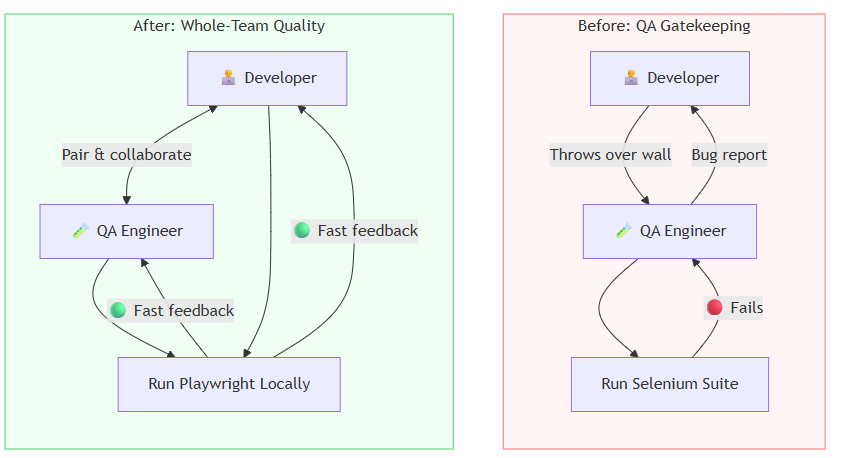
Fig 3: The shift from QA gatekeeping to whole-team quality ownership.
And something unexpected happened: with fewer false-negative test failures to chase, QA engineers started doing more exploratory testing. Instead of spending hours debugging flaky Selenium infrastructure, they could focus on creative, scenario-based testing that automated suites can’t replicate.
2. Don’t Be Sentimental About Tools
We had years of investment in Selenium. Custom frameworks, training materials, interview questions built around it. Letting go was hard. But holding onto a tool because of sunk cost is a trap.
3. Migration Is Easier Than You Think
The Playwright API is intuitive, especially if you have a developer background. Most engineers were productive within a day. The hardest part wasn’t learning Playwright — it was convincing stakeholders to invest the time.
4. CI/CD Integration Is Where It Shines
Running Playwright in GitHub Actions or any CI pipeline is trivial — pick your language:
C# (.NET):
- name: Run Playwright tests (C#)
  run: dotnet test
  env:
    PLAYWRIGHT_BROWSERS_PATH: 0
Python (pytest):
- name: Run Playwright tests (Python)
  run: |
    pip install playwright pytest-playwright
    playwright install --with-deps
    pytest tests/
Java (Maven):
- name: Run Playwright tests (Java)
  run: |
    mvn exec:java -e -D exec.mainClass=com.microsoft.playwright.CLI -D exec.args="install --with-deps"
    mvn test
JavaScript / TypeScript (npm — most common for React projects):
- name: Run Playwright tests (JS/TS)
  run: |
    npm ci
    npx playwright install --with-deps
    npx playwright test
No Grid setup, no browser driver management, no version mismatches — regardless of which language your team prefers.
For React teams: Playwright’s JS/TS runner is the natural choice. It integrates seamlessly with your existing
package.json, supports TypeScript natively, and the@playwright/testrunner gives you parallel execution, HTML reports, and trace files out of the box.
The Verdict
Here’s the full picture of how testing architecture, tooling, and culture evolved:
Migration
🟢 Present: Playwright Era
Build Time Execution
Local Web Server
Playwright + Mocked APIs
Isolated & Reliable
<1% Flaky Rate
Team Trusts Tests
10+ Releases/Day
🔴 Past: Selenium Era
Monolith Deployment
Shared Environment
Selenium Grid
Real External Services
30-40% Flaky Rate
Distrust in Tests
Slower Releases

Fig 4: The complete transformation — from slow, fragile, distrusted testing to fast, reliable, team-owned quality.
Selenium served us well for years. It pioneered browser automation and created an entire industry around automated testing. That legacy deserves respect.
But the web has moved on. Playwright is built for the web as it exists today — fast, async, component-driven, and complex. It’s not just a better Selenium; it’s a fundamentally different approach to browser automation.
If you’re still running Selenium suites and spending hours on flaky tests, infrastructure debugging, and slow pipelines — the sunset is here. The rise of Playwright isn’t coming; it’s already happened.
Make the switch. Your team will thank you.
Have questions about migrating from Selenium to Playwright? Connect with me on LinkedIn or check out my projects on GitHub.
© 2026 Mohammad Kashif. Built with Jekyll & GitHub Pages.